How this feature connects to others
Builds on
Feature overview
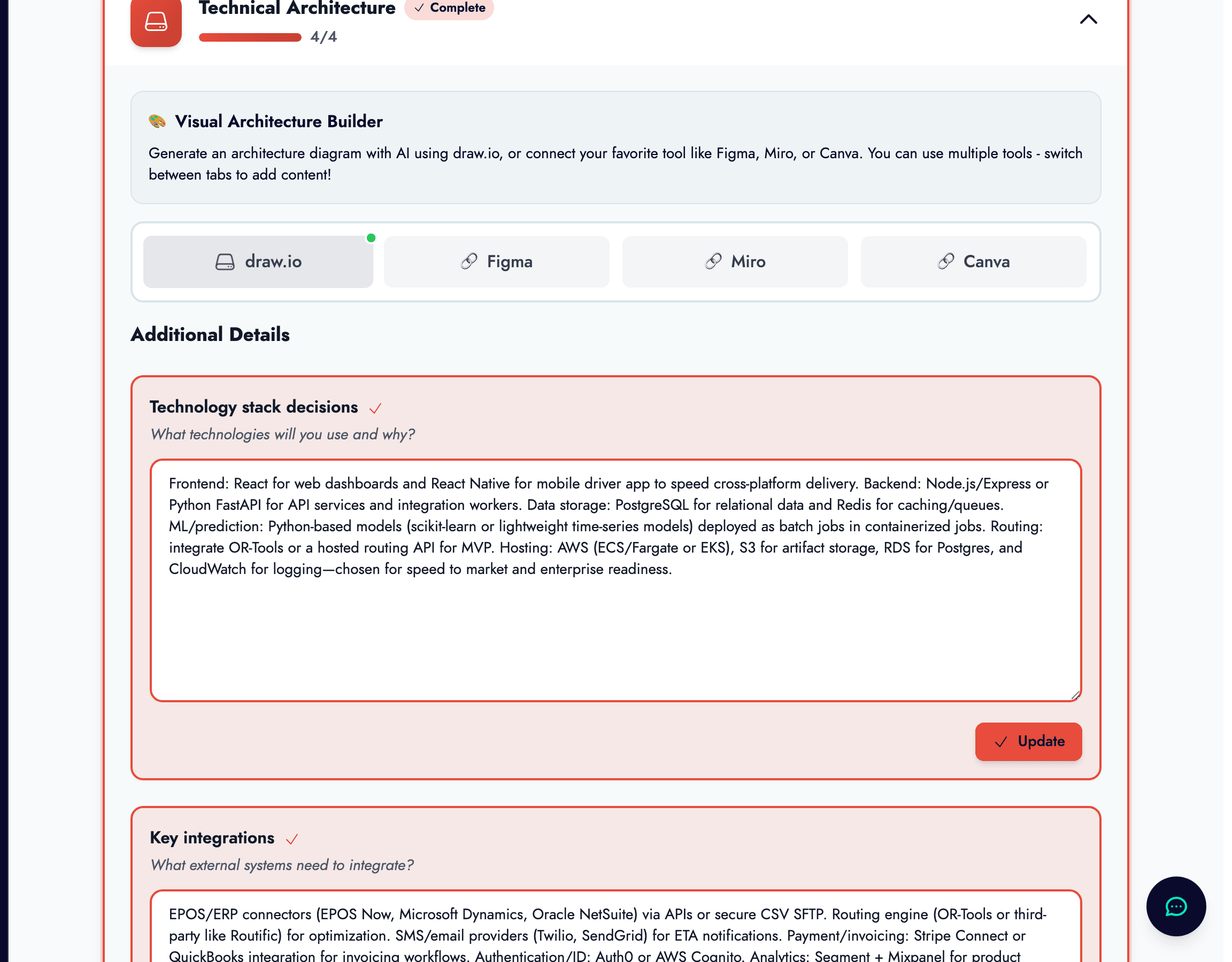
What the Technical Diagram Editor is, and where it lives
The Technical Diagram Editor lives inside the Technical Architecture section of MVP Requirements. It is the visual counterpart to the written architecture fields in your PRD. The written document explains what the system should do and the constraints it must respect. The diagram explains how the parts connect.
That is useful because architecture becomes much easier to discuss once it is visible. A paragraph describing a frontend, an API layer, authentication, background jobs, and a database can be technically accurate and still difficult to reason about. A diagram makes the boundaries, dependencies, and data flows legible immediately.
For founders working with developers, this visual layer is often the difference between a vague technical conversation and a concrete one. For founders building themselves, it acts as a planning aid that reduces the chance of forgetting key infrastructure or service relationships once coding begins.
How zigzag lets you work across different tools
The editor is designed to be flexible rather than ideological. Inside the Technical Architecture section, zigzag gives you tabs for draw.io, Figma, Miro, and Canva. That means you do not have to force your team into a single design tool just to keep the architecture section complete.
If you want a directly editable embedded diagram, draw.io is the deepest integration. If your team already sketches architecture in a whiteboard-style tool or maintains design documents elsewhere, you can also attach those through the other tabs. Zigzag keeps the architecture section as the shared home, even when the visual asset comes from more than one source.
This matters for real teams, because architecture work is rarely neat. Early diagrams often start as rough sketches, then become more structured as the product matures. The multi-tool approach lets you evolve that process without losing the project context around it.
Generating a diagram or loading one you already have
If you are on an eligible paid plan, zigzag can generate a technical architecture diagram with AI from your MVP Requirements. That is helpful when you want a fast first draft based on the product, data, and workflow decisions already captured in the PRD. You can also regenerate the diagram later if the architecture changes materially.
If you already have a diagram, you do not need to rebuild it from scratch. The draw.io flow lets you import an existing file by pasting a supported diagrams.net or Google Drive URL. That makes it practical to bring prior work into zigzag rather than keeping the most important system diagram stranded in another tool.
The right choice depends on what stage you are in. Generate when you need a strong starting point. Import when you already have a diagram worth preserving. Use the external-tool tabs when the architecture discussion is still collaborative and fluid across a broader design workflow.
The current import flow supports links such as
- ✓Google Drive file links that contain a draw.io diagram.
- ✓diagrams.net and draw.io links that include a file identifier.
- ✓Direct external references through the Figma, Miro, and Canva tabs when you prefer to keep the source in those tools.
What happens once the diagram is inside zigzag
When you are using the embedded draw.io editor, zigzag treats the diagram as a working asset rather than a static attachment. You can edit it directly in the page, rely on autosave while you work, export it as a PNG when you need an image, or download the raw draw.io file when you want a portable editable source.
The editor is set up for focused architecture work rather than general design clutter. It loads the embedded diagrams.net experience, handles saving and export through the platform, and keeps the diagram attached to the project so it remains part of the build story rather than a disconnected file on someone’s laptop.
That project attachment matters because architecture diagrams are only useful when people can find the current version. A stale diagram in a forgotten folder is worse than no diagram at all. Keeping it inside the project makes it much easier for co-founders, developers, and reviewers to work from the same system picture.
What a good early-stage architecture diagram should include
At the MVP stage, the goal is clarity, not technical theatre. A useful diagram should show the main user-facing interface, the core application layer, the main data store, authentication or identity boundaries, third-party services that are genuinely important, and any background processes or integrations that change the product experience materially.
What it usually should not do is pretend you are already a hyperscale platform. If you are pre-seed, a diagram with twelve microservices, message queues everywhere, and infrastructure you do not yet need is often a sign that the architecture is performing sophistication rather than describing reality. Keep it as simple as the product honestly is.
As the system evolves, update the diagram where the architecture has actually changed. That means new integrations, meaningful data-flow changes, new system boundaries, or a real infrastructure shift. Do not redraw it every time a button moves. This is a technical planning artifact, not a design mood board.
How the diagram connects to the rest of the build process
Inside zigzag, the diagram is not an isolated feature. It supports better MVP Requirements, gives developers a clearer implementation reference, and strengthens downstream build work such as MVP Building and the Coding Agent by making your intended system structure easier to interpret.
It is also valuable outside the build team. An architecture diagram can help you explain technical depth to investors, advisors, or technical collaborators who need to understand whether the product is realistic. In other words, it is both a planning tool and a communication tool.
Used well, the Technical Diagram Editor gives you something simple but rare in early-stage work: a visual system model that stays connected to the same project data as your requirements, brand, and strategy. That makes the technical side of the business easier to reason about as the company evolves.